

Laptop Desk Arm Guide: How to Choose the Best in 2026

Struggling with neck pain or a cluttered desk? The right laptop desk arm can transform your workspace in 2026. As more professionals embrace remote and hybrid work, ergonomic solutions are in high demand. This guide walks you through every step to select the best laptop desk arm for your needs. Discover the benefits, must-have features, cutting-edge innovations, compatibility tips, ergonomic advice, and a handy buying checklist. Ready to boost your comfort and productivity? Dive in and make an informed choice for a healthier, more efficient workspace.
Why Use a Laptop Desk Arm in 2026?
Modern workspaces demand more than just a standard desk. As we move into 2026, the laptop desk arm stands out as an essential tool for healthier, more productive, and more flexible work environments. Here is why investing in a laptop desk arm is a smart decision for both professionals and home users.

Enhanced Ergonomics and Health Benefits
A laptop desk arm helps you achieve and maintain healthy posture by allowing precise screen height and angle adjustments. This reduces strain on your neck, shoulders, and eyes, which is crucial as remote and hybrid work continue to grow. Studies consistently show that ergonomic workspaces lead to fewer musculoskeletal complaints and can even boost productivity. For more on these findings, see the Benefits of ergonomics in the workplace.
Using a laptop desk arm also supports standing desk setups, encouraging active work routines and reducing the risks associated with prolonged sitting.
Maximizing Workspace Efficiency
One of the most noticeable advantages of a laptop desk arm is the ability to reclaim valuable desk space. By lifting your device off the surface, you create a cleaner, more organized environment. This not only looks better but also makes it easier to focus.
Many laptop desk arm models support multiple devices, allowing seamless switching between a laptop and an external monitor. Professionals report experiencing less clutter and increased productivity when their workspaces are streamlined in this way.
Frees up desk space for documents and accessories
Enables dual-screen setups for multitasking
Reduces cable chaos with integrated management
Flexibility for Hybrid and Remote Work
Today’s workforce requires adaptable solutions. A laptop desk arm offers the flexibility needed for changing work environments, whether you are at home, in a co-working space, or moving between locations.
Quick installation and portability mean you can set up your workspace wherever you need it. Adjustable arms accommodate a variety of desk shapes and sizes, making them ideal for professionals who value mobility and efficiency.
Supporting Modern Technology and Laptops
Laptops are becoming lighter, thinner, and more powerful. A modern laptop desk arm is designed to safely support these new devices, keeping them secure while allowing for full adjustability.
Compatibility with external keyboards, mice, and other peripherals means you can create an ergonomic workstation tailored to your specific needs. This adaptability is essential for those using gaming laptops, ultrabooks, or MacBooks in 2026.
Sustainability and Longevity
Sustainability is a growing concern for many buyers. Premium laptop desk arm brands are responding by using recycled materials and designing products built to last.
Durable construction reduces replacement cycles
Recycled aluminum and plastics support eco-friendly goals
Extended warranties offer peace of mind
By choosing a high-quality laptop desk arm, you not only invest in your own comfort and efficiency but also contribute to a more sustainable future.
Key Features to Consider When Choosing a Laptop Desk Arm
Selecting the right laptop desk arm in 2026 requires attention to detail. With so many options, it is essential to focus on features that enhance both comfort and productivity. By understanding the most important criteria, you can ensure your workspace is both ergonomic and efficient.
Weight Capacity and Size Compatibility
The first critical feature when evaluating a laptop desk arm is its weight capacity and size compatibility. Each arm is designed to support a specific weight range, often between 2 and 10 kilograms. Matching your arm to your laptop’s weight prevents sagging and ensures stability.
Measure your laptop’s dimensions and check the maximum tray size supported by the arm. Oversized laptops or gaming models may require larger trays, while ultrabooks fit most standard arms. Always verify that the laptop desk arm can handle your device’s load for long-term reliability.
Adjustability: Height, Tilt, Swivel, and Rotation
A highly adjustable laptop desk arm is essential for ergonomic comfort and productivity. Look for arms offering full motion, including height adjustment, tilt, pan, and 360-degree rotation. This flexibility allows you to switch between sitting and standing positions with ease.
Research shows that workers experience increased comfort and fewer musculoskeletal complaints when using adjustable equipment. For more insights into effective design, review this systematic review of ergonomic furniture research, which highlights the importance of adjustability in workspace health.
Mounting Options: Clamp, Grommet, and Wall Mounts
Laptop desk arm mounting options vary to suit different work environments. The most common methods are desk clamps, grommet mounts, and wall mounts. Desk clamps are ideal for most standard desks and require minimal installation effort.
Grommet mounts offer a secure fit through pre-drilled holes, making them perfect for thicker surfaces. Wall mounts give you ultimate flexibility and free up desk space but demand more complex installation. Choose the mounting style that matches your desk type and installation skills for best results.
Build Quality and Material Choices
The build quality of a laptop desk arm directly impacts its durability and aesthetics. Premium arms use materials like aluminum or reinforced steel for strength and longevity. These materials resist scratches and maintain a sleek appearance over time.
Plastic components may lower costs but are less durable in the long run. Pay attention to the quality of joints and finishes. A robust construction ensures your investment stands up to daily use, supporting your laptop securely throughout its lifespan.
Cable Management Systems
Integrated cable management is a valuable feature in any laptop desk arm. Look for arms equipped with built-in clips, channels, or trays designed to route cords neatly along the arm’s structure. This not only keeps your workspace tidy but also prevents cables from tangling or snagging.
A well-organized cable system supports a clean, professional look and makes it easier to connect external monitors, keyboards, and other devices. Effective cable management is a sign of thoughtful design and enhances the overall user experience.
Aesthetics and Workspace Integration
A laptop desk arm should complement your workspace’s style. Manufacturers now offer arms in various colors, finishes, and minimalist designs to match modern office decor. Consider the visual impact of the arm, especially if your setup is visible during video calls or presentations.
Select a color and finish that aligns with your personal taste and the surrounding environment. Harmonizing your laptop desk arm with other office elements creates a cohesive, attractive workspace that supports both focus and creativity.
Price, Warranty, and Value
When comparing laptop desk arm options, evaluate the balance between price, warranty, and overall value. Budget models may provide basic functionality, while premium arms offer extended warranties, high-end materials, and add-on features like USB hubs.
Check warranty terms carefully, as top brands may offer coverage up to 10 years. Consider bundled accessories and customer support as part of the value proposition. Investing in a quality product ensures your workspace remains adaptable and efficient for years to come.
Step-by-Step Guide: How to Choose the Best Laptop Desk Arm in 2026
Choosing the right laptop desk arm in 2026 can feel overwhelming with so many options. This step-by-step guide will help you navigate the process, ensuring you get the most ergonomic, compatible, and efficient solution for your workspace. Let us break down each step so you can confidently select the perfect laptop desk arm.
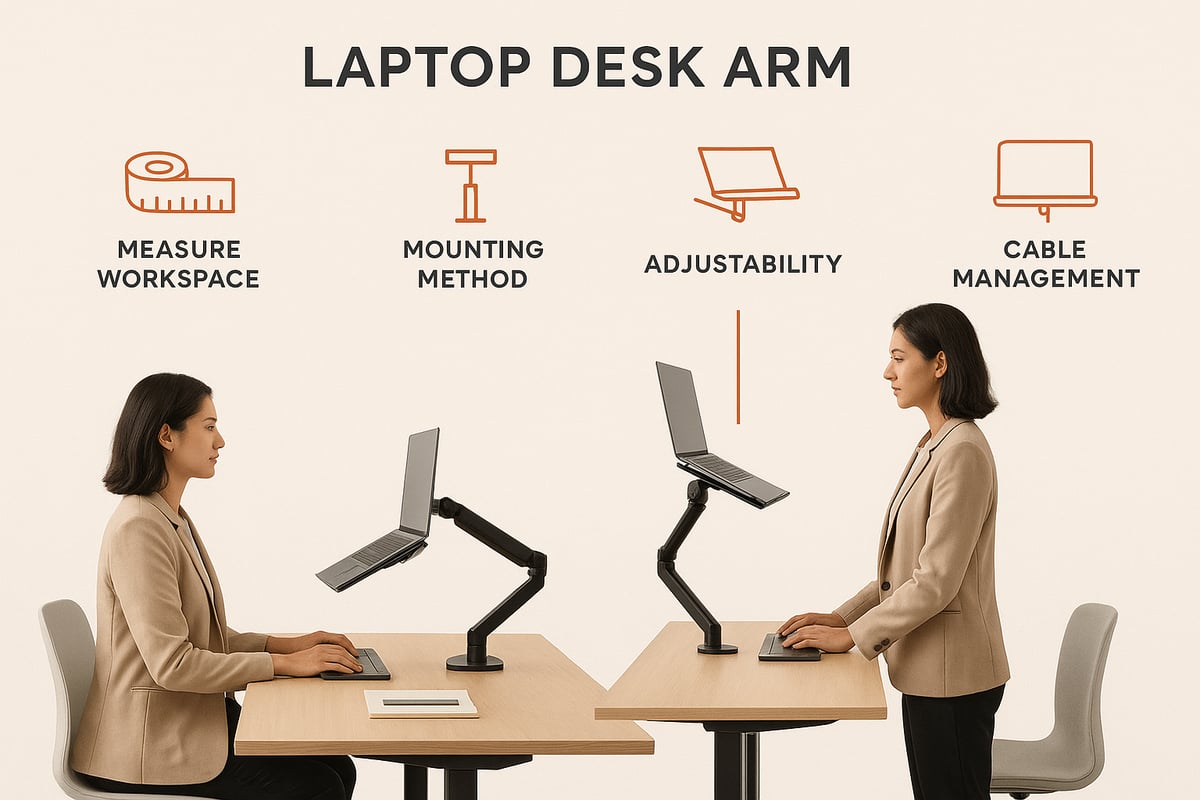
Step 1: Assess Your Workspace and Needs
Begin by evaluating your workspace. Measure your desk’s width, depth, and thickness to determine where a laptop desk arm can be securely installed. Identify mounting locations and consider whether you work primarily sitting, standing, or a mix of both.
Think about your daily habits. Do you use multiple screens? Need to switch between devices? List your must-have features, such as height adjustability or quick-release trays. For more detailed ergonomic guidance, explore these ergonomic workspace tips to optimize your setup.
Step 2: Check Laptop Compatibility
Next, confirm your laptop’s size, weight, and cooling needs. Not every laptop desk arm fits all models, so check the manufacturer’s specifications. Ensure the tray or platform supports your laptop’s dimensions and allows for adequate ventilation to prevent overheating.
If you use a gaming laptop, ultrabook, or MacBook, double-check grip styles and tray adjustability. Compatibility is crucial for both safety and comfort when using a laptop desk arm.
Step 3: Select the Right Mounting Method
Choosing the proper mounting method is essential. There are three main types: clamp, grommet, and wall mounts. Your desk’s material and structure will often dictate the best choice.
Mounting Type |
Best For |
Pros |
Cons |
|---|---|---|---|
Clamp |
Most desks |
Easy install, portable |
Needs edge clearance |
Grommet |
Thick desks |
Stable, clean look |
Requires drilling hole |
Wall Mount |
Permanent use |
Saves desk space |
Complex install |
Match your mounting selection to your desk’s design and your installation skills. A stable foundation is vital for a reliable laptop desk arm.
Step 4: Evaluate Adjustability and Range of Motion
Test or review how smoothly the laptop desk arm moves. Look for full motion capabilities, including height, tilt, pan, and 360-degree rotation. This flexibility allows you to shift between sitting and standing with ease.
Highly adjustable arms support better posture and can accommodate different tasks throughout the day. Prioritize arms that make ergonomic transitions simple and intuitive.
Step 5: Consider Build Quality and Materials
Inspect the construction quality before making a decision. Premium laptop desk arms use materials like aluminum or steel for durability and a sleek appearance.
Check for reinforced joints and high-quality finishes that resist scratches. A sturdy build ensures your laptop desk arm will last through years of daily adjustments.
Step 6: Review Cable Management and Extras
Tidy cables are key to a clutter-free workspace. Many laptop desk arms include integrated cable management systems, such as built-in clips or channels.
Look for extra features like USB hubs or accessory trays. These additions help keep your devices charged and your desk organized, making your laptop desk arm even more functional.
Step 7: Compare Brands, Models, and Warranties
Research reputable brands known for reliability and customer support. Compare models based on user reviews, ratings, and warranty periods—some offer coverage up to 10 years.
A quick checklist for comparison:
Warranty length
Customer support quality
Verified user feedback
Availability of replacement parts
These factors ensure your investment in a laptop desk arm is protected.
Step 8: Set Your Budget and Purchase
Finally, decide on your budget. Laptop desk arms range from budget-friendly to premium models with advanced features. Balance your needs with your spending limits, and look for seasonal promotions or bundled accessories.
Before purchasing, double-check all requirements: compatibility, adjustability, mounting, materials, and extras. With careful planning, you can select a laptop desk arm that elevates both comfort and productivity.
Latest Innovations and Trends in Laptop Desk Arms for 2026
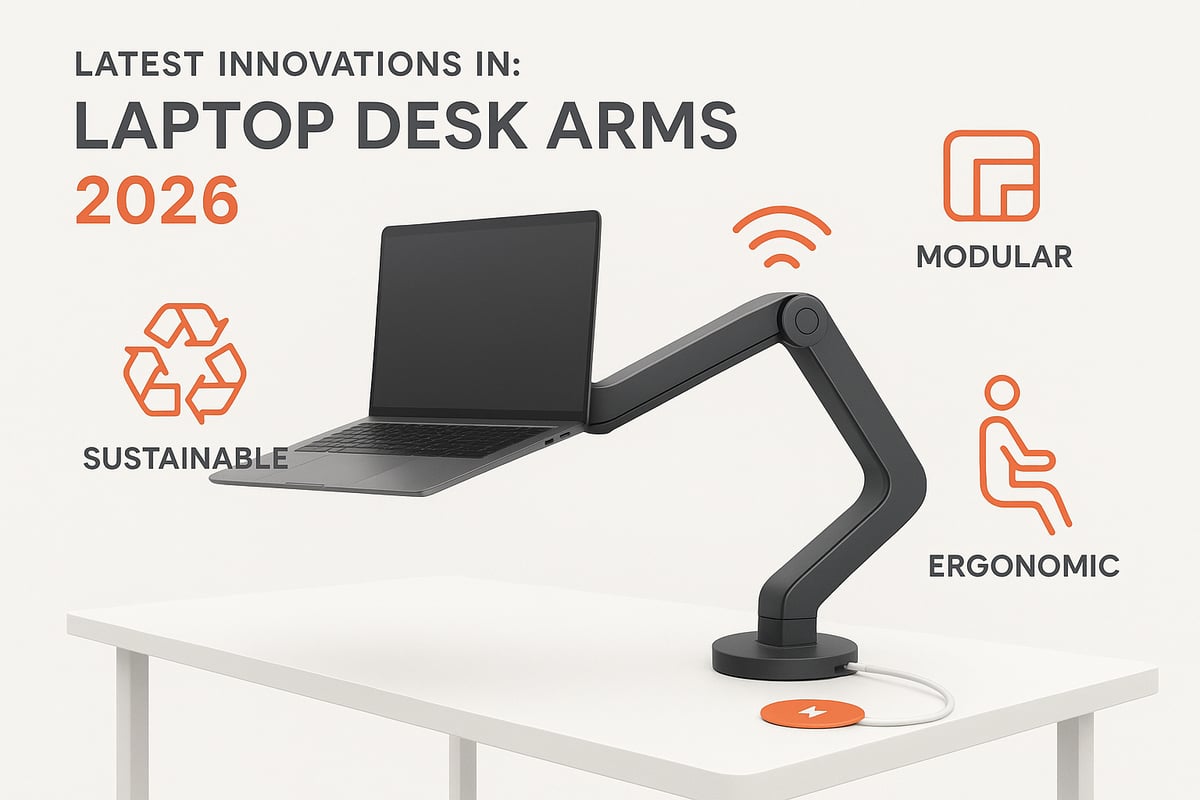
Laptop desk arm technology is evolving rapidly in 2026. Modern workspaces demand smarter, more sustainable, and highly adaptable solutions. Let us explore the top innovations shaping the future of the laptop desk arm.
Smart Features and Connectivity
In 2026, the laptop desk arm is becoming a hub for connectivity. Premium models now feature built-in USB-C hubs, allowing seamless connection of peripherals. Some arms offer wireless charging pads integrated into the tray, letting you power up devices without extra clutter.
IoT compatibility is gaining traction. Certain laptop desk arm brands now provide app-controlled adjustments, so you can fine-tune height, tilt, and rotation from your smartphone. Memory presets enable quick switches between preferred positions, making the laptop desk arm a truly smart addition to your setup.
Sustainable Materials and Eco-Friendly Manufacturing
Sustainability is a central focus for laptop desk arm manufacturers. Leading brands are using recycled aluminum and plastics, reducing the environmental impact of each product. Some companies are moving toward carbon-neutral production, ensuring that your laptop desk arm supports both your work and the planet.
Extended warranties and modular components also contribute to sustainability. By choosing a laptop desk arm built with longevity in mind, you reduce waste and support a more responsible approach to workspace design.
Enhanced Ergonomics and Micro-Movement
Ergonomics is at the heart of the latest laptop desk arm innovations. New designs encourage micro-movements and active work, supporting dynamic postures throughout the day. These arms integrate seamlessly with standing desks and accessories, providing a holistic approach to wellness.
For those seeking to maximize comfort and productivity, the laptop desk arm can be paired with other active workstation tools. You can explore the benefits of active workstations to understand how movement and ergonomics go hand in hand.
Modular and Customizable Designs
Flexibility is crucial, and the modular laptop desk arm is on the rise in 2026. Many arms now feature interchangeable trays, monitor adapters, and accessory mounts. This allows users to upgrade or modify their setup as technology evolves or needs change.
With a modular laptop desk arm, you can easily switch between supporting different devices or add features like document holders and extra trays. This adaptability future-proofs your workspace and ensures your investment remains valuable for years.
Aesthetic and Minimalist Designs
Modern offices prioritize aesthetics as much as function. The latest laptop desk arm models are slim, low-profile, and available in a range of colors. Matte finishes and minimalist lines help these arms blend into any workspace, from home offices to corporate environments.
Customization options are expanding. Users can now choose a laptop desk arm that matches their personal style and complements their existing decor. This focus on design ensures that your workspace remains both efficient and visually appealing.
Laptop Desk Arm Compatibility: Laptops, Desks, and Accessories
Choosing the right laptop desk arm in 2026 requires careful attention to compatibility across devices, desks, and accessories. A perfect match ensures ergonomic comfort, stability, and workspace efficiency. Let us walk through the essential criteria for making an informed selection.
Ensuring a Perfect Fit for Your Laptop
Proper compatibility starts with matching your laptop to the selected laptop desk arm. Measure your laptop's dimensions and weight, then compare them to the arm's specifications. Most arms in 2026 support a range of devices, from lightweight ultrabooks to robust gaming laptops.
Look for trays with adjustable grips or secure clamps that accommodate different thicknesses. Ventilation is another key factor, especially for high-performance laptops. An open tray design or perforated platform helps prevent overheating, keeping your device running optimally.
Before purchasing, check for any manufacturer compatibility lists to ensure your specific laptop model fits the laptop desk arm safely.
Desk Types and Mounting Requirements
Not all desks are created equal, so consider your desk's material and structure when choosing a laptop desk arm. Common desk surfaces in 2026 include wood, glass, and metal, each with unique mounting considerations.
Clamp mounts are popular for standard wooden desks, while grommet mounts work best for desks with cable holes. For glass or thin metal desks, look for arms with reinforced pads to prevent damage. If space is limited or your desk has an unusual shape, wall-mounted options can offer stability without sacrificing workspace.
For more ideas on optimizing your setup, check out these desk organization hacks that complement a laptop desk arm.
Accessory Integration: Keyboards, Mice, and Monitors
A laptop desk arm is most effective when paired with the right accessories. External keyboards and mice allow for a healthier typing posture, minimizing strain during long work sessions. Many arms are designed to work alongside monitor arms, supporting dual-screen productivity for multitaskers.
Consider cable management features to keep cords from keyboards, mice, and monitors tidy and out of the way. Some arms include built-in USB hubs or accessory trays for even greater integration.
Test your typical workflow to ensure all peripherals remain accessible and ergonomically placed when using a laptop desk arm.
Safety and Stability Considerations
Safety is paramount when installing a laptop desk arm. Always verify that the arm's weight capacity exceeds your laptop's weight, including any added accessories. Look for anti-slip features such as rubberized grips or locking mechanisms to keep your device secure.
Proper weight distribution not only prevents tipping but also protects your desk surface. Periodically check all joints and fasteners for tightness, especially if you frequently adjust the arm's position. Regular maintenance extends the lifespan of both your laptop desk arm and your workspace setup.
Ergonomic Tips for Setting Up Your Laptop Desk Arm
Making the most of your laptop desk arm setup means focusing on ergonomics from the start. A properly arranged workspace can prevent discomfort and help you stay energized throughout the day. Let us explore the essential steps for a healthier, more productive work environment.
Optimal Screen Height and Viewing Angle
Position your laptop desk arm so the top of the screen is at or just below eye level. This helps keep your neck in a neutral position and reduces strain. Studies show that improper screen height can lead to musculoskeletal discomfort, especially over long periods. Adjust the tilt of your screen to minimize glare and maintain a comfortable viewing distance, about an arm’s length away.
Consider how light sources impact your screen. A slight downward tilt can help reduce reflections from overhead lights. For a deeper understanding of the risks associated with poor screen positioning, read about the health-related consequences of electronic device use. With a laptop desk arm, fine-tuning these angles is quick and intuitive.
Workspace Layout and Posture
Arrange your workspace so your external keyboard and mouse are within easy reach, allowing your elbows to rest at a 90-degree angle. Keep your wrists straight and your shoulders relaxed to maintain a natural posture. The laptop desk arm should allow you to position your device directly in front of you, reducing the need for twisting or reaching.
If you use multiple devices, ensure each is positioned to promote symmetry and balance. Avoid clutter by using cable management features on your laptop desk arm. An organized workspace helps you focus and supports long-term comfort.
Adjusting for Sitting and Standing Work
One advantage of a laptop desk arm is the ability to switch between sitting and standing positions. When standing, raise the arm so the screen remains at eye level, and adjust the tray to keep wrists neutral. Pairing your setup with a standing desk and tools like balance boards for standing desks can encourage micro-movements, further reducing fatigue.
Transition smoothly between sitting and standing by saving your preferred arm positions, if your model supports memory presets. This flexibility keeps your body engaged and supports a healthier work routine.
Routine Checks and Adjustments
Regularly inspect your laptop desk arm for loose joints or signs of wear. Tighten any connections as needed to ensure stability. Periodically adjust the arm’s position to suit different tasks, such as typing, video calls, or reading documents.
A proactive approach helps maintain ergonomic benefits and extends the life of your equipment. Remember, small adjustments can lead to significant improvements in comfort and productivity over time. Make it a habit to review your setup at least once a month.
The Ultimate 2026 Laptop Desk Arm Buying Checklist
Creating the perfect workspace starts with the right laptop desk arm. With so many options in 2026, making an informed choice requires a clear, organized approach. Use this comprehensive checklist to ensure your selection meets your ergonomic, functional, and aesthetic needs.
Step-by-Step Pre-Purchase Checklist
Before investing in any laptop desk arm, walk through each of these steps to guarantee a seamless fit for your workspace:
Assess Your Workspace
Measure desk thickness, depth, and available mounting space. Note any unique features, such as rounded edges or limited clearance.Evaluate Ergonomics
Prioritize adjustability and posture support. Research confirms that an ergonomic assessment of home workstations can significantly reduce discomfort and prevent strain.Check Laptop Compatibility
Confirm your device’s weight, dimensions, and ventilation needs. Ensure the tray or platform supports your specific laptop model securely.Select Mounting Method
Match clamp, grommet, or wall mount options to your desk’s material and structure.Inspect Build Quality
Choose arms made of durable materials like aluminum or steel. Look for reinforced joints and high-quality finishes.Review Cable Management
Integrated routing systems help maintain a clutter-free workspace.Consider Aesthetics
Pick a design and color that complements your office décor.Evaluate Value and Warranty
Compare price points, included accessories, and warranty coverage.
By following this process, you can narrow choices and avoid costly mistakes.
Model Comparison Worksheet
Use the table below to compare top laptop desk arm models based on critical features:
Model Name |
Weight Capacity |
Adjustability |
Mount Type |
Material |
Warranty |
Price Range |
|---|---|---|---|---|---|---|
Arm A |
2-8 kg |
Full motion |
Clamp |
Aluminum |
5 years |
$100-$150 |
Arm B |
3-10 kg |
Height, tilt |
Grommet |
Steel |
10 years |
$150-$220 |
Arm C |
2-7 kg |
Swivel, pan |
Wall mount |
Plastic |
3 years |
$60-$100 |
Fill in your own shortlist to visualize differences and match your priorities.
Key Questions and Future-Proofing
When contacting retailers or manufacturers, ask:
Does the laptop desk arm support my device’s size and weight?
Are all mounting accessories included?
What is the return policy and warranty period?
Can the arm be upgraded or paired with accessories in the future?
Also, consider how your workspace needs might evolve. Will you add a monitor, switch desks, or upgrade your laptop soon? Choose a flexible model that can adapt to changes.
Trusted Resources and Support
Rely on reputable sources for user reviews, installation guides, and troubleshooting tips. Manufacturer websites, industry publications, and tech forums provide valuable insights. Bookmark these resources to support your decision-making and future adjustments.
Empowered by this checklist, you are ready to invest in a laptop desk arm that will enhance your comfort, productivity, and workspace style for years to come.
Now that you know what to look for in a laptop desk arm and how it can elevate your workspace, it’s the perfect time to explore options designed for performance, comfort, and longevity. If you’re ready to create a healthier, more productive environment—whether you’re standing, sitting, or moving throughout your day—FluidStance offers innovative solutions that fit seamlessly into any setup. Their commitment to premium design and sustainable materials means you can invest in products that support both your workflow and your well being.
Check out how FluidStance products enhances your workflow
Leave a comment