

Sit Stand Desk Cable Management Guide: Streamline Your Workspace 2026

Is tangled wiring turning your workspace into a daily frustration? You are not alone. Many professionals find that cable clutter disrupts their focus and productivity, especially with adjustable desks.
This comprehensive guide to sit stand desk cable management is designed to help you reclaim control over your office environment. By mastering the art of organizing cables, you will create a workspace that is both efficient and visually appealing in 2026.
Discover why cable management matters, the challenges unique to sit stand desks, essential tools, step-by-step solutions, and the latest innovations. Ready to transform your setup? Let us get started.
Why Cable Management Matters for Sit Stand Desks
Is your workspace hindered by tangled cords and cluttered cables? In 2026, sit stand desk cable management is more than a trend, it is a necessity for productivity and safety. Let us explore why this essential practice should be at the top of your workspace priorities.
The Impact of Poor Cable Management
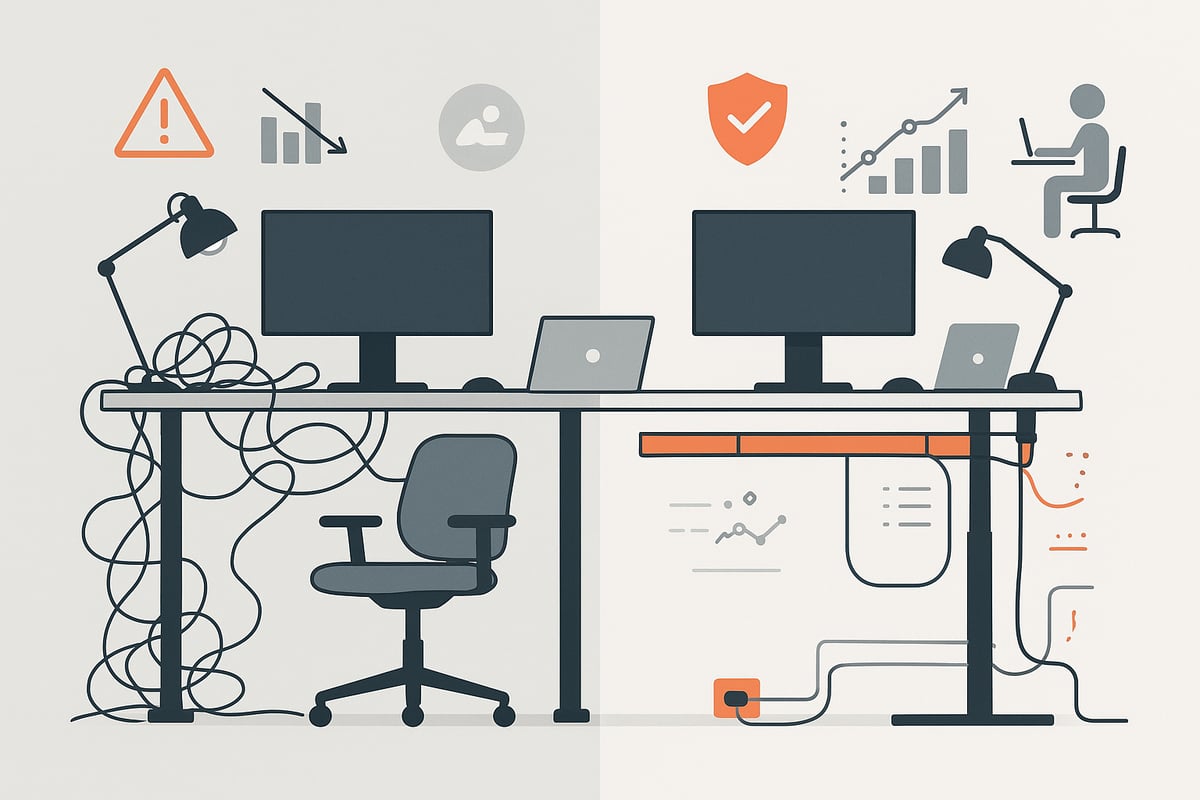
Poor sit stand desk cable management introduces multiple hazards into any office. Loose or tangled cables can create tripping risks, potentially leading to falls or injuries. Exposed wires may also increase the chance of electrical shorts or even equipment failure.
A cluttered environment does not just affect safety. Visual disorder from unmanaged cables can elevate stress and reduce focus, impacting overall productivity. In a professional setting, messy cables can undermine the polished look you want to project.
Ergonomically, cables that are not properly routed can restrict your desk's movement. This limits flexibility and makes it harder to switch between sitting and standing positions. According to a 2025 office survey, 67% of workers reported that cable clutter distracts them at least once a week.
Unique Challenges of Sit Stand Desk Setups
Sit stand desk cable management presents unique obstacles compared to traditional desks. The height adjustability feature means cables must be flexible and securely routed to prevent snagging or stretching when the desk moves.
Modern workspaces also connect more devices than ever. Monitors, laptops, chargers, and peripherals all bring extra cords that need to be managed. If cables are left loose, each adjustment increases the risk of stretching, unplugging, or damaging connections.
Another challenge is ensuring that the cable setup remains stable across all desk heights. Without careful planning, cables may get caught or pulled, leading to interruption or equipment wear.
Benefits of Effective Cable Management
Prioritizing sit stand desk cable management leads to significant workplace improvements. A streamlined setup enhances safety by reducing tripping and electrical hazards. Properly organized cables last longer and are less likely to suffer from wear.
An organized desk also boosts satisfaction and creates a more visually appealing workspace. Cleaning and maintenance become easier, as surfaces are free from tangled cords. For hybrid and flexible work environments, efficient cable management supports frequent adjustments and device swaps.
For actionable strategies on organizing your workspace, see these desk organization and productivity tips, which complement the benefits of effective cable management.
Benefits Table
Benefit |
Impact |
|---|---|
Enhanced Safety |
Fewer accidents, less equipment damage |
Increased Productivity |
Reduced distractions, better focus |
Improved Aesthetics |
Professional, clean appearance |
Easier Maintenance |
Faster cleaning, easier upgrades |
Example Scenarios
Consider a tech startup that implemented structured sit stand desk cable management. The result? IT support tickets dropped by 30%, as cable-related issues became rare.
Home office users often struggle with space constraints, making cable management vital for comfort and tidiness. In contrast, corporate setups may face larger volumes of devices and more complex layouts, requiring scalable solutions for every workstation.
Whether you work remotely or in a bustling office, the right approach to sit stand desk cable management transforms your environment from chaotic to streamlined.
Essential Cable Management Tools and Accessories for 2026
A well-organized sit stand desk cable management setup begins with the right tools and accessories. As workspaces grow more connected and adjustable, selecting modern solutions is crucial for maintaining order and efficiency. Let us explore the most effective products and trends shaping cable management in 2026.
Modern Cable Management Solutions
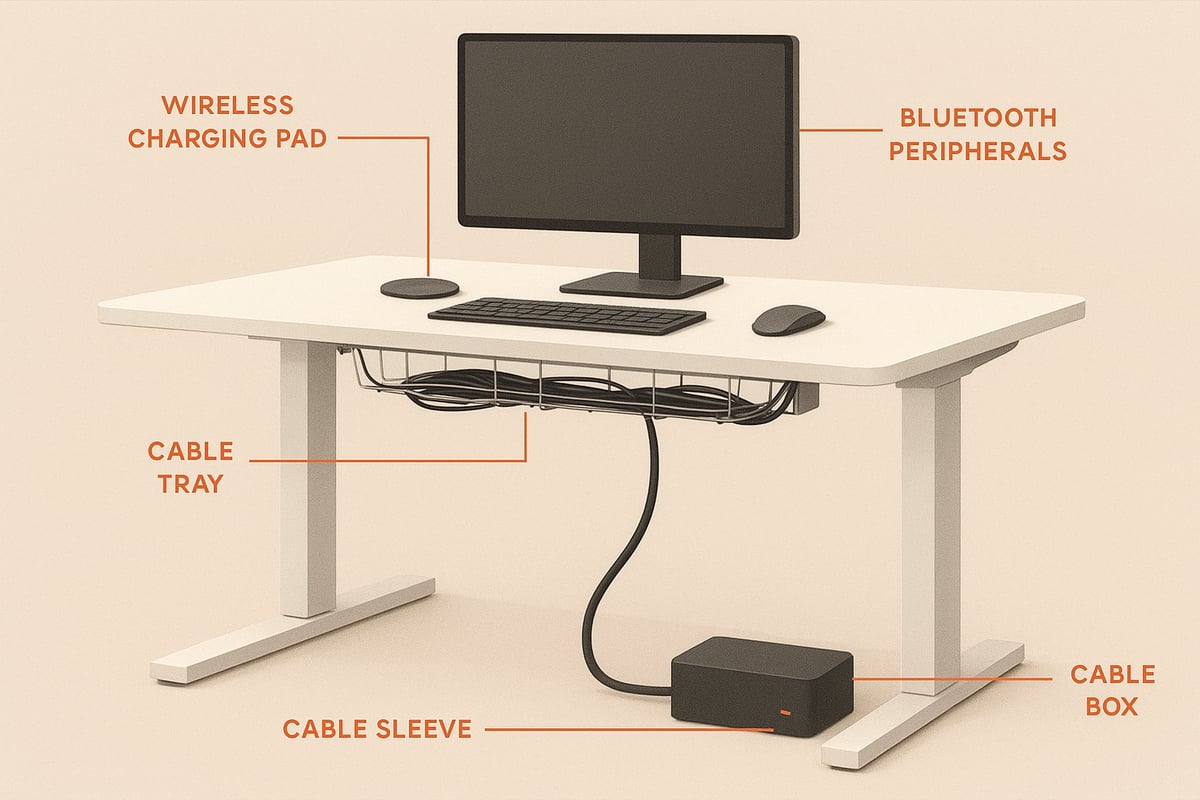
For sit stand desk cable management to be effective, start with the essentials. Cable trays are mounted beneath the desk to route and hide multiple cords, keeping them protected during height adjustments.
Cable sleeves and raceways group cables together, shielding them from dust and accidental pulls. Adhesive cable clips and mounts attach cables to the desk’s frame, ensuring they stay secure even as the surface moves. Cable boxes provide an attractive way to conceal power strips and bulky adapters, reducing visual clutter.
Retractable and coiled cables are especially useful for sit stand desk cable management, as they flex with desk movement and prevent tangling. These modern solutions address both safety and aesthetics, making desk adjustments seamless.
Smart and Tech-Driven Accessories
As technology evolves, so do the accessories supporting sit stand desk cable management. Wireless charging pads and integrated power modules minimize the need for excess cables on your desk. Bluetooth and wireless peripherals further reduce cable volume, contributing to a tidy environment.
Modular desk grommets allow flexible cable routing, adapting as you add or remove devices. Surge protectors with USB-C and USB4 support are essential for powering modern electronics safely and efficiently. By incorporating these smart accessories, your cable management system stays future-ready and adaptable to new tech.
Sustainability and Design Trends
Sustainability has become a top priority in sit stand desk cable management. In 2026, eco-friendly materials are widely used for cable organizers, sleeves, and trays. Minimalist, color-coordinated accessories blend seamlessly with contemporary office décor.
According to recent data, there was a 22% increase in demand for sustainable desk accessories in 2025. For those seeking environmentally responsible options, the Eco-friendly workspace solutions guide highlights products made from recycled materials and designed for longevity.
These trends not only support a greener planet but also enhance the visual harmony of your workspace.
Choosing the Right Tools for Your Workspace
Selecting the best sit stand desk cable management tools depends on your specific setup. Consider the size of your desk, the number of devices, and how often you adjust desk height. Compatibility with sit stand features is essential to ensure cables remain secure during movement.
Compare popular cable trays, sleeves, and boxes based on flexibility, capacity, and ease of installation. For example, a compact home office may benefit from adhesive clips and slim sleeves, while a corporate setup might require heavy-duty trays and modular organizers.
Product Type |
Best Use Case |
Flexibility |
Sustainability |
|---|---|---|---|
Cable Tray |
Multi-device, large desks |
High |
Varies |
Cable Sleeve |
Grouping, aesthetics |
Medium |
High |
Retractable Cable |
Frequent height adjustments |
High |
Medium |
Cable Box |
Power strip concealment |
Low |
High |
Choose tools that align with your workflow, technology mix, and design preferences for optimal results.
Step-by-Step Sit Stand Desk Cable Management Process
Transforming your workspace starts with an organized approach to sit stand desk cable management. A systematic process ensures every cord and device is accounted for, minimizing distractions and supporting a productive environment. Follow these seven essential steps to achieve a streamlined, efficient setup.
Step 1: Assess and Plan Your Workspace
Begin your sit stand desk cable management by taking stock of your entire setup. List all devices, including monitors, laptops, chargers, and peripherals. Map out where power outlets, data ports, and network connections are located in your office.
Identify which cables will move with the desk and which will stay stationary. Consider how your desk’s height adjustments might affect cable tension or reach. Consult Office ergonomics essentials to ensure your planning supports both comfort and efficiency in cable placement.
Sketch a quick diagram or use a digital tool to visualize cable paths. This preparation makes every next step faster and more effective.
Step 2: Disconnect, Sort, and Label
Power down all equipment before starting this stage of sit stand desk cable management. Unplug and gather every cable, grouping by device type or function. This reduces confusion and prevents cables from getting mixed up.
Sort cables into categories such as power, data, and accessories. Use color-coded ties or adhesive labels to tag each end. This practice will make future changes or troubleshooting much easier.
Keep a notepad handy to record which label matches each device. Organizing upfront saves time and frustration during reassembly.
Step 3: Mount Power Strips and Surge Protectors
For effective sit stand desk cable management, securely mount power strips and surge protectors beneath the desk surface. Use brackets, screws, or strong adhesive mounts, depending on your desk material.
Position these power sources so they are easy to reach but do not interfere with the desk’s movement. Leave enough slack in the cords to accommodate the full range of desk height adjustments.
An optimal placement prevents stretching or pulling on cables when the desk moves. Test the setup by moving the desk up and down, ensuring all connections remain stable.
Step 4: Route and Secure Cables
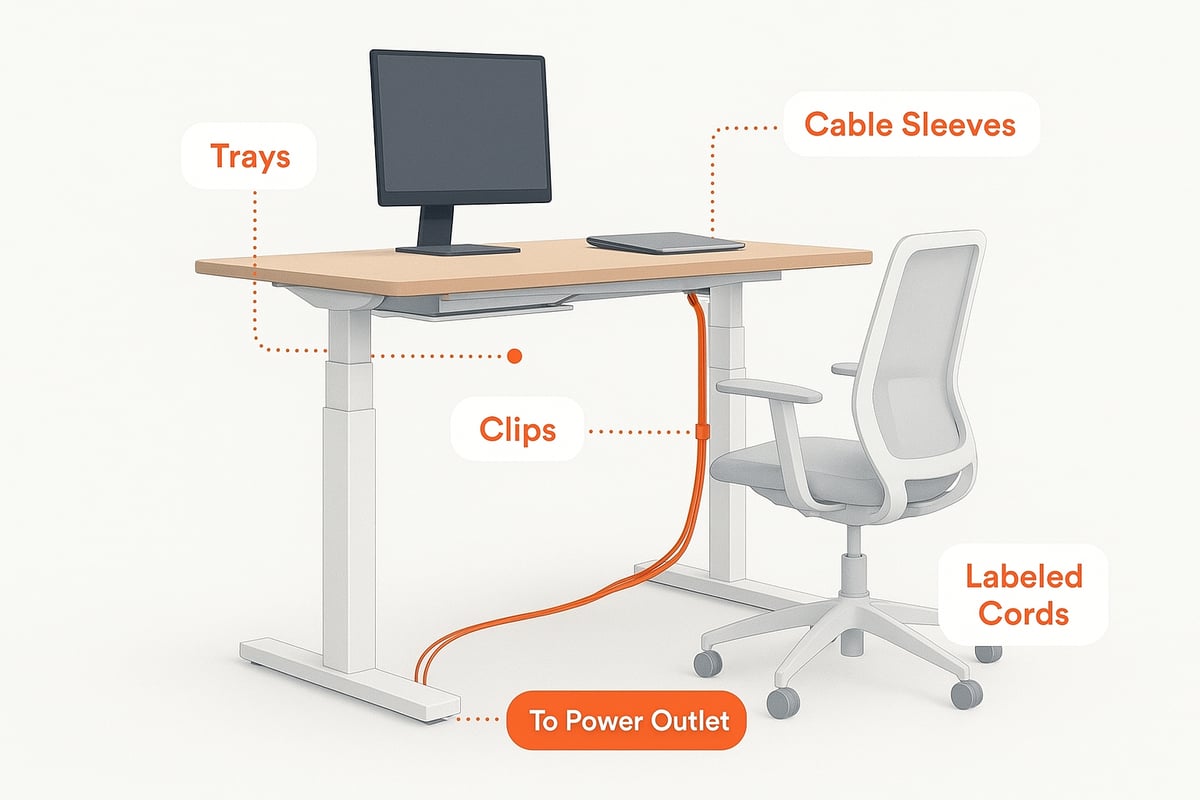
Next, route cables along planned paths using trays, sleeves, or raceways. These solutions are fundamental for sit stand desk cable management, keeping cords grouped and protected.
Attach flexible cable clips or chains to moving desk parts. This allows cables to flex and move without tangling or catching. Avoid tight bends or sharp angles, as these can damage wires over time.
Pay special attention to high-movement areas, such as monitor arms and motor cables. Double-check that all fastenings are secure.
Step 5: Manage Excess Cable Length
Coil any extra cable neatly with Velcro ties or place them inside cable boxes. For sit stand desk cable management, it is crucial to keep slack close to the endpoints, allowing cables to move freely as the desk rises and lowers.
Minimizing slack reduces tripping hazards and prevents cables from getting snagged. According to recent data, reducing cable slack can decrease snag incidents by up to 40 percent.
Regularly check that coils are loose enough to prevent stress on connectors or ports.
Step 6: Test Desk Movement and Adjust
Raise and lower your desk through its entire height range to observe how cables behave. This step is a vital part of sit stand desk cable management, as it ensures nothing pulls, stretches, or tangles.
If you notice any resistance or see cables lifting off the surface, adjust placements or add more flexible clips. Continue testing until the desk moves smoothly without interference.
Taking the time to test now will prevent future frustration and equipment damage.
Step 7: Finalize and Tidy Up
Finish your sit stand desk cable management by bundling and hiding any remaining visible cables. Use cable sleeves or raceways to maintain a clean look along the back and underside of the desk.
Double-check that all connections are secure and that labels are visible for easy identification. Wipe down cable trays and organizers to remove dust and debris.
A tidy workspace is easier to clean and maintain, setting the stage for long-term productivity and satisfaction.
Advanced Solutions for Modern and Hybrid Workspaces
Modern offices and home setups are evolving rapidly, demanding more from sit stand desk cable management than ever before. With hybrid work models, diverse tech stacks, and wellness-focused designs, advanced solutions are essential for a streamlined, future-ready workspace. Let us explore how to elevate your desk management for 2026.
Integrating Smart Technology
Integrating smart technology into sit stand desk cable management brings efficiency and adaptability. Wireless charging pads, smart power strips, and IoT-enabled cable management products help reduce cable clutter and automate power usage. For instance, some desks now offer built-in cable routing and charging docks, seamlessly blending function with design.
Smart accessories can also monitor device usage and prompt healthy behaviors. For those interested in wellness, Sit-Stand Desk Software Enhances Health Behaviors illustrates how digital tools can support healthy movement habits throughout the workday.
By investing in smart solutions, you not only keep cables organized but also future-proof your workspace for new technologies and workflows.
Accommodating Multiple Devices and Configurations
Managing cables with multiple monitors, laptops, and docking stations can be challenging. Sit stand desk cable management strategies must support flexibility for shared spaces or hot-desking environments. Modular cable organizers and adjustable trays allow users to reconfigure setups quickly as needs change.
For dual-monitor arrangements, use cable sleeves or raceways to bundle cords and maintain a clean look. In coworking spaces, color-coded clips help distinguish personal equipment from shared resources. These tools are essential for keeping productivity high and minimizing downtime caused by tangled or misplaced cables.
Future-Proofing Your Desk Setup
Technology standards are always shifting. Future-proofing your sit stand desk cable management means planning for USB4, Thunderbolt 5, and higher-wattage devices. Scalable cable management systems, like expandable trays or modular grommets, allow for easy upgrades without a full reorganization.
Consider creating a device inventory and mapping anticipated additions. This proactive approach ensures your workspace stays efficient and organized, even as new tech is introduced. According to a 2025 report, 35 percent of offices plan to upgrade to smart desks by 2026, making adaptability a crucial consideration.
Aesthetic and Wellness Considerations
A well-organized desk is not just about function; it also supports wellness and aesthetics. Choose color-coordinated cables and organizers to create a cohesive, visually pleasing environment. Integrate ambient lighting and ergonomic accessories to boost comfort and reduce eye strain.
Thoughtful sit stand desk cable management contributes to a clutter-free workspace, which in turn enhances focus and reduces stress. Minimalist designs and concealed cable solutions keep your desk looking polished and professional, supporting both productivity and well-being.
Sustainability and Workspace Trends
Sustainability is becoming a major trend in workspace design. In 2026, eco-conscious materials and reusable cable management tools are in high demand. Choose organizers made from recycled plastics or biodegradable components to minimize environmental impact.
Adapt your sit stand desk cable management for remote, hybrid, and flexible work models. This might include portable cable boxes or reusable Velcro ties that can travel with you. Embracing sustainable solutions not only benefits the environment but also aligns your workspace with modern values and future needs.
Maintenance and Upkeep: Keeping Your Workspace Streamlined
A streamlined workspace is not a one-time achievement. Consistent maintenance is essential to preserve the benefits of sit stand desk cable management. By creating simple routines and staying proactive, you ensure your workspace remains clutter-free, safe, and ready for productivity in 2026.
Routine Inspection and Adjustment
Set a monthly reminder to inspect your sit stand desk cable management system. Look for signs of cable wear, loose mounts, or tangling. Regular adjustments prevent cables from snagging as you change desk heights.
Start by checking all cable ties, trays, and clips. Make sure each component is secure and undamaged. Update cable labels if you add or remove devices. This habit keeps your cable management system effective and responsive to your evolving workspace.
Cleaning and Hygiene Practices
Dust and debris can collect in cable trays and around cable clusters. Include sit stand desk cable management in your regular cleaning routine. Use a microfiber cloth to wipe down trays, sleeves, and cable surfaces.
For deeper cleaning, gently detach cable organizers and vacuum the area. Clean cables not only look better, they also last longer and reduce fire risk. Make it a habit to tidy cables during your regular workspace cleaning schedule.
Adapting to New Devices and Needs
Technology evolves, and so will your workspace. When adding new peripherals, review your sit stand desk cable management plan. Disconnect and label cables before reorganizing, then integrate new devices logically.
If you remove devices, take time to eliminate excess cables and organizers. This keeps your setup efficient and prevents unnecessary clutter. A flexible cable management system supports seamless transitions as your work needs change.
Troubleshooting Common Issues
Occasionally, you may encounter loose mounts, cable snags, or dropped connections. Quickly address these issues to maintain the integrity of your sit stand desk cable management.
Tighten or replace any failing adhesive clips. Recoil slack cables to avoid tangles. If a cable shows damage or wear, replace it promptly. Routine troubleshooting minimizes downtime and preserves safety.
Long-Term Benefits
Consistent sit stand desk cable management pays off over time. You will notice fewer equipment failures, lower maintenance costs, and a more professional appearance. A tidy workspace also supports better focus and productivity.
Research highlights that optimized desk setups contribute to improved health and work outcomes. For example, the Effects of Sit-Stand Desk Intervention on Health and Productivity study shows that proper desk organization supports sustained productivity gains. By prioritizing upkeep, you maintain the full benefits of your investment in 2026.
Sit Stand Desk Cable Management Inspiration and Real-World Examples
Transforming your workspace is easier when you see real-life results. Discover how sit stand desk cable management can make a dramatic difference in both home and corporate environments. Learn from inspiring setups, expert advice, and common questions to help you create a streamlined, efficient workspace in 2026.
Home Office Success Stories
For many remote workers, sit stand desk cable management has been a game changer. Consider the case of Sarah, a freelance designer, who struggled with cables tangling every time she raised her desk. After implementing cable sleeves and under-desk trays, she reported fewer distractions and a boost in focus.
Before organizing, her workspace felt chaotic and difficult to clean. With the new system, she now enjoys a clutter-free environment that supports creativity and productivity. These home office transformations highlight how a little attention to cable management can make daily work smoother.
Corporate Workspace Case Studies
Corporate offices are also reaping the benefits of sit stand desk cable management. A tech company in San Francisco recently overhauled their open-plan office, introducing structured cable routing and modular organizers for all adjustable desks.
The result? IT support tickets dropped by 25% and employees found it easier to switch between seating and standing positions without cable snags. According to internal data, downtime due to cable issues decreased significantly, proving that investing in cable management pays off for large teams.
Workspace Type |
IT Downtime Reduction |
Employee Satisfaction Increase |
|---|---|---|
Corporate |
25% |
40% |
Home Office |
15% |
30% |
Visual Gallery: Trending Desk Setups for 2026
The rise of sleek, organized workspaces is shaping sit stand desk cable management trends in 2026. Minimalist setups feature seamless cable trays and color-matched organizers that blend with modern décor.
Eco-friendly solutions, such as biodegradable cable ties and recycled plastic raceways, are becoming popular for those seeking sustainability. Tech-integrated desks now offer built-in cable channels and wireless charging pads, keeping all connections tidy and out of sight. These design choices show how cable management can elevate both form and function in any workspace.
Expert Tips and Community Insights
Workspace professionals recommend starting with a clear plan for sit stand desk cable management. Label all cables and group similar wires with clips or Velcro ties. Use adhesive mounts to keep cords aligned with desk edges, allowing for smooth height adjustments.
Community members often share creative hacks, like using fabric sleeves for a unified look or mounting power strips under the desk for easy access. To further enhance your setup, consider integrating ergonomic accessories, such as the options found in this standing desk balance boards guide, which complement a tidy and functional workstation.
Frequently Asked Questions
Q: How do I prevent cables from snagging when adjusting my sit stand desk?
A: Use flexible cable chains and leave some slack near moving parts to ensure smooth transitions.
Q: What is the best way to hide power strips?
A: Cable boxes or under-desk trays are ideal for concealing power strips and adapters.
Q: Can cable management help with cleaning?
A: Absolutely. Organized cables are easier to dust and keep clean, reducing buildup around your desk.
Q: Are there sustainable options for sit stand desk cable management?
A: Yes. Look for organizers made from recycled materials or reusable Velcro ties for an eco-friendly approach.
Q: How often should I check my cable setup?
A: Inspect your cables monthly to ensure they remain secure and undamaged, especially after adding new devices.
Now that you’ve seen how effective cable management can transform your sit stand desk into a truly streamlined and inspiring workspace, why not take the next step? Imagine how much more productive and energized you’ll feel when your environment supports movement, focus, and well being every day. If you’re ready to elevate both your workflow and your workspace, I encourage you to Check out how FluidStance products enhances your workflow. You’ll find thoughtfully designed tools that help you move more, reduce clutter, and create a high performance setup you’ll love.
Leave a comment