

Uplift Desk Wire Management Guide: Organize Cables in 2026

Cable clutter is a growing challenge in today’s flexible offices, especially with the surge in standing desks and hybrid work setups heading into 2026. A messy workspace can disrupt focus, pose safety risks, and undermine the benefits of an ergonomic desk.
This guide will show you how to master uplift desk wire management for a workspace that is organized, safe, and visually appealing. You will discover why cable organization matters, review Uplift Desk’s latest solutions, and learn step-by-step strategies to keep every wire in check.
By following these expert tips, you can create a streamlined desk that boosts productivity, impresses colleagues, and adapts to future tech needs.
Why Wire Management Matters for Uplift Desk Users
Tangled cables beneath your desk are more than just an eyesore. For Uplift Desk users, messy wires can affect everything from safety to device performance. Mastering uplift desk wire management is essential if you want a workspace that is safe, efficient, and ready for 2026’s hybrid work demands.
Enhanced Safety and Ergonomics
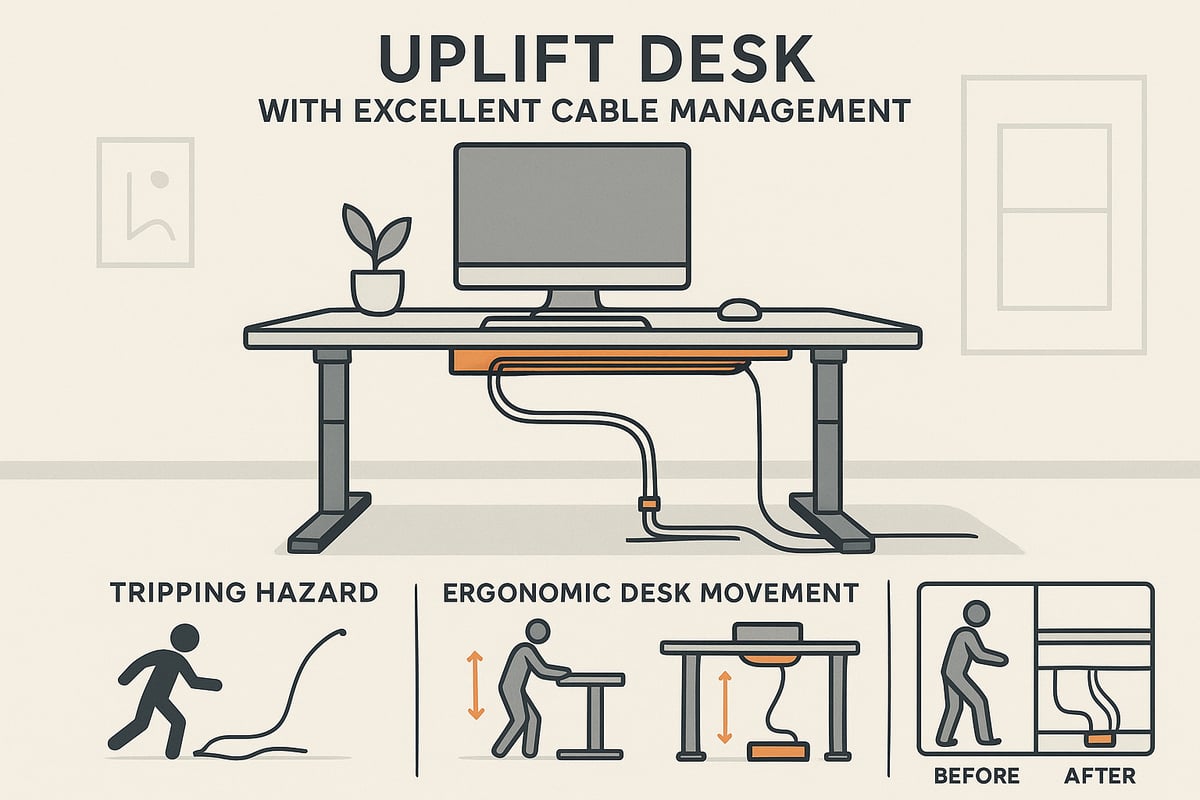
Proper uplift desk wire management reduces the risks of trips and electrical hazards. Loose cables on adjustable desks can snag or pull, especially when switching between sitting and standing positions. By securing cables, you allow your desk to move freely without interruption. Many standing desk users have reported fewer accidents and a smoother ergonomic experience after organizing their cables.
- Prevents tripping over stray wires
- Minimizes electrical risks
- Supports smooth, ergonomic desk movement
Boosted Productivity and Focus
A clutter-free workspace boosts focus. Tangled cords can distract, slow you down, and even cause stress during busy workdays. Research shows that organized desktops lead to up to 20% higher productivity. According to the Impact of Workspace Organization on Productivity, streamlined cable management is directly linked to improved efficiency for professionals.
- Reduces visual clutter and distractions
- Supports better mental clarity
- Empowers you to work more efficiently
Improved Aesthetics and Professionalism
Clean cable management transforms your desk’s appearance. A tidy setup impresses clients and coworkers during video calls, while before-and-after photos of Uplift Desk installations highlight the dramatic difference organization makes. With uplift desk wire management, your space looks intentional and professional.
- Creates a visually appealing environment
- Enhances your professional image
- Ideal for open offices and home video calls
Device Longevity and Performance
Cables under constant stress or tangling can fray, short-circuit, or fail. Uplift desk wire management helps prevent cable strain, extending the lifespan of your devices. Integrated surge protectors, included in Uplift kits, also safeguard equipment from power surges, ensuring your tech investment lasts longer.
- Reduces cable wear and tear
- Minimizes device downtime
- Protects against power surges
Adaptability for Hybrid and Remote Work
A well-managed setup makes it simple to reconfigure your workspace. Whether you are at home or in the office, organized cables mean you can move devices or change configurations with ease. Many remote workers find uplift desk wire management essential for smooth transitions between sitting and standing, or when switching equipment.
- Supports flexible workspace changes
- Eases the transition between work modes
- Simplifies adding or removing technology
Environmental Impact
Choosing reusable cable ties and eco-friendly materials in your wire management strategy can significantly reduce electronic waste. Uplift kits now feature components made from sustainable materials, supporting a greener office environment.
- Cuts down on single-use plastics
- Encourages responsible workspace choices
- Aligns with modern sustainability goals
Cost Savings Over Time
Investing in uplift desk wire management means fewer damaged cables and reduced equipment replacement costs. Over time, the savings from avoiding cable-related issues add up, making wire management a smart long-term investment for any Uplift Desk user.
- Decreases maintenance expenses
- Reduces need for cable replacements
- Provides lasting value for your workspace
Overview of Uplift Desk Wire Management Solutions in 2026
Modern workspaces demand smart solutions, and uplift desk wire management has evolved to meet these needs in 2026. With an emphasis on flexibility, safety, and aesthetics, Uplift Desk delivers comprehensive options that suit both home offices and corporate environments.
Uplift Desk’s Integrated Wire Management Features
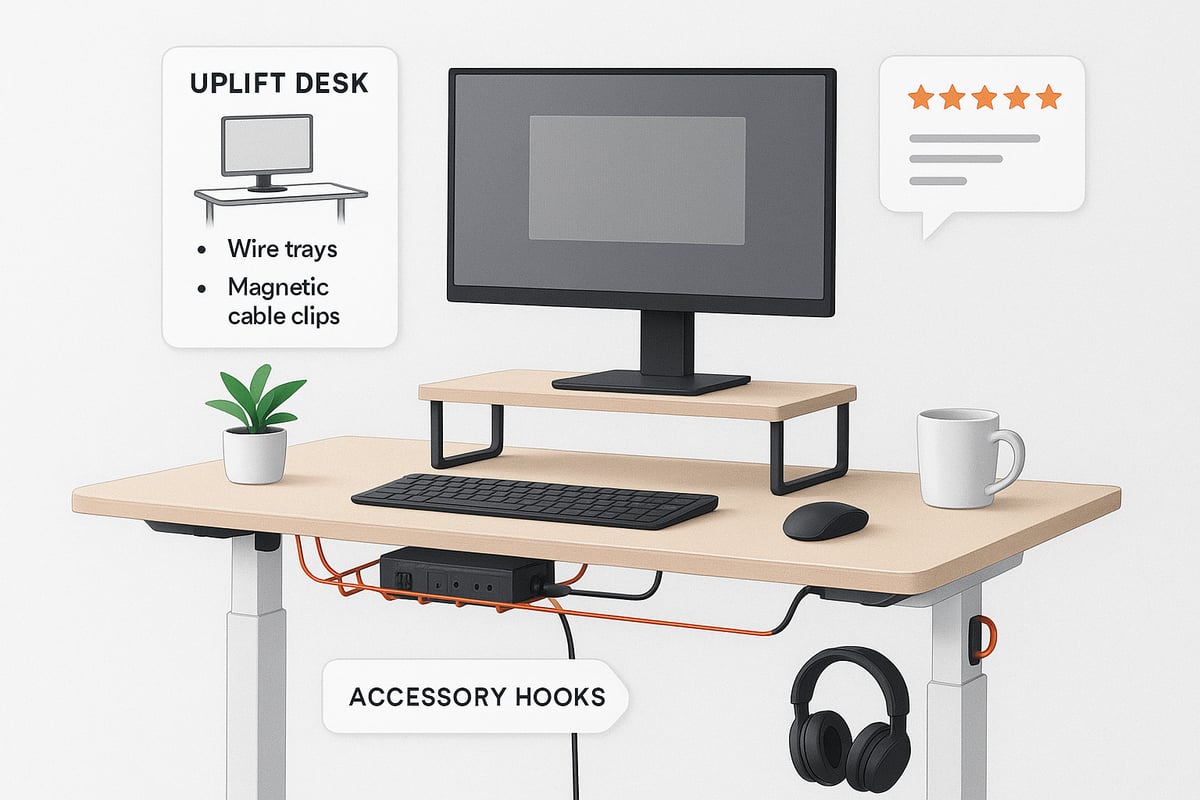
Every Uplift Desk comes equipped with built-in wire management features. A wire management tray and ten cable tie mounts are included at no extra cost, making it easy to start organizing right away. These components are designed for compatibility with both Uplift and non-Uplift desks.
For instance, the Uplift V3 Standing Desk offers dedicated cable routing channels, helping maintain a clutter-free environment. This foundation ensures uplift desk wire management is accessible to users with various setups, whether for a single workstation or a multi-device configuration.
Wire Management Kits: Basic, Advanced, and Ultimate
Uplift Desk offers three levels of wire management kits to address different workspace complexities. The Basic Kit contains essentials like a surge protector, organizer, adhesive and screw mounts, reusable ties, clips, and an accessory hook. The Advanced Kit builds on this by adding a wire management tray, while the Ultimate Kit further includes a 28.5-inch modesty panel for superior cable concealment.
Pricing is transparent: Basic Kits start at $39, Advanced at $49, and Ultimate at $99. This tiered approach to uplift desk wire management ensures users can select the ideal kit for their needs.
Key Accessories and Add-Ons
Beyond standard kits, Uplift Desk provides a variety of accessories to enhance wire management. Magnetic cable channels and clips allow flexible routing of cables along the desk frame. Zipped cable sleeves help bundle multiple wires for a streamlined appearance.
Other popular add-ons include under-desk hooks for headphones or bags and mountable surge protectors or USB hubs for efficient power management. These tools make uplift desk wire management adaptable as your technology collection grows.
Product Reviews and User Feedback
Customer satisfaction with uplift desk wire management is consistently high. The Ultimate Kit currently holds a 4.6 out of 5 rating from more than 17 reviews, while the Magnetic Cable Channel boasts a 4.8 out of 5 from 228+ users. Many testimonials highlight improved organization and safety.
For a deeper look at kit performance and user experiences, check out this Uplift Desk Wire Management Kit Review. Real-world feedback confirms the effectiveness of these products in transforming cluttered desks.
Warranty and Support
Uplift Desk backs its wire management solutions with a 15-year warranty, covering all products in the lineup. Customers appreciate the free returns available within 30 days, making it easy to try different configurations risk-free.
Users also report responsive support teams, especially when replacement parts are needed. This commitment to service ensures uplift desk wire management remains a long-term investment for any workspace.
Comparison Table: Kits and Accessories
To help you decide, here is a summary table outlining what each kit includes:
| Feature/Kit | Basic Kit | Advanced Kit | Ultimate Kit |
|---|---|---|---|
| Surge Protector | ✓ | ✓ | ✓ |
| Organizer & Clips | ✓ | ✓ | ✓ |
| Tray | ✓ | ✓ | |
| Modesty Panel | ✓ | ||
| Price (USD) | $39+ | $49+ | $99+ |
This table simplifies uplift desk wire management comparison, making it easier to match your workspace needs.
Customization Options
Personalization is a core aspect of uplift desk wire management in 2026. Users can choose from various colors for magnetic channels and trays to match desk finishes. Modular add-ons allow for future expansion, ensuring your system grows with your tech requirements.
Whether upgrading for aesthetics or adapting to new devices, customization helps maintain an organized, visually appealing workspace. This flexibility keeps uplift desk wire management at the forefront of modern office solutions.
Step-by-Step Guide: Organizing Cables on Your Uplift Desk
Mastering uplift desk wire management is simple when you break the process into clear, manageable steps. Follow this guide to transform your workspace into a tidy, efficient, and ergonomic environment in 2026.
1. Assess Your Workspace and Devices
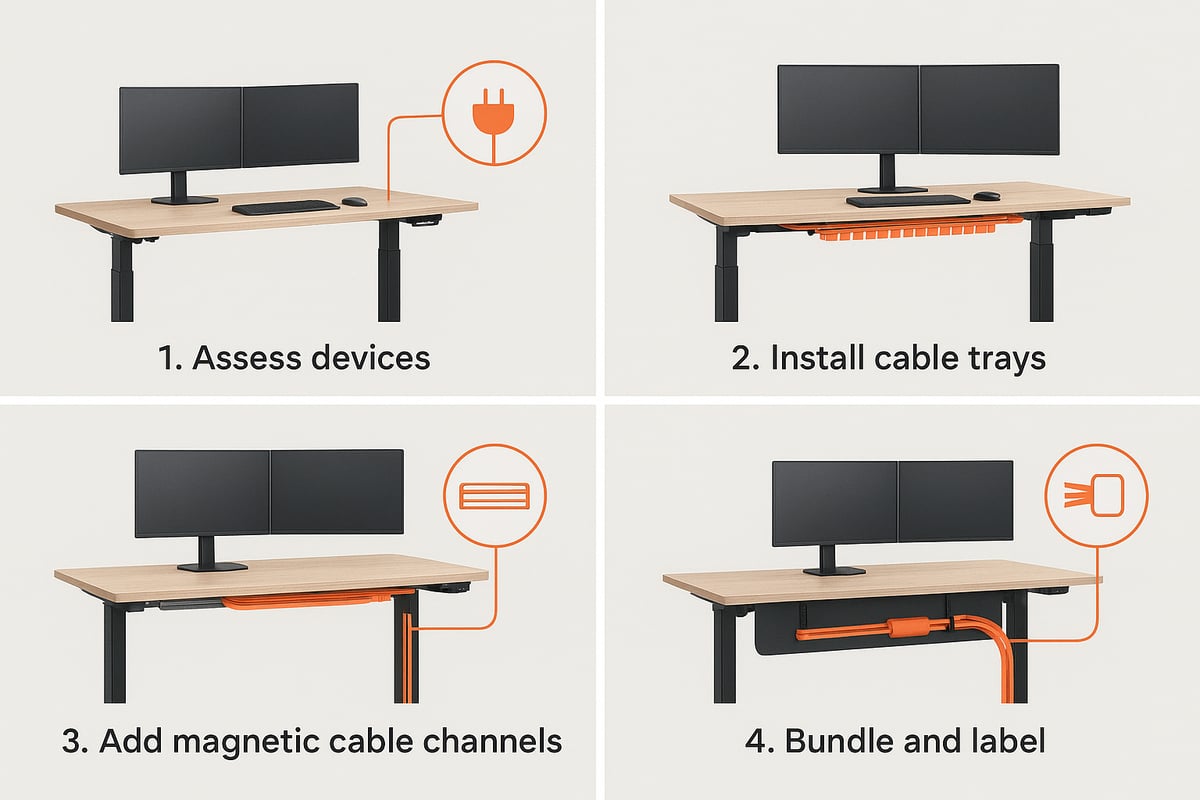
Begin uplift desk wire management by listing every device you use. Consider your monitors, laptops, phone chargers, lamps, speakers, and any other tech essentials.
- Write down each device and note the type and number of cables needed.
- Map out where your power outlets are located.
- Identify cable entry and exit points on your desk.
For example, a dual-monitor setup with a laptop dock will have several power and data cables. Knowing your needs upfront ensures you choose the right solutions and avoid last-minute surprises.
2. Choose the Right Wire Management Kit
The next step in uplift desk wire management is selecting a kit that matches your setup’s complexity. Uplift offers Basic, Advanced, and Ultimate kits, each designed for different needs.
| Kit | Best For | Key Components |
|---|---|---|
| Basic | Simple setups | Surge protector, organizer, ties, clips |
| Advanced | Multi-device workstations | All Basic + wire management tray |
| Ultimate | High-tech, visible desks | All Advanced + modesty panel |
If you have multiple screens or frequently adjust your desk, the Advanced Kit is recommended. For a detailed overview of cable solutions, see Cable Management Solutions for Standing Desks, which covers the latest innovations for 2026.
3. Prepare Your Desk for Installation
Proper preparation makes uplift desk wire management smoother and more effective.
- Unplug all devices and clear your workspace.
- Clean the underside of your desk where mounts and trays will be attached.
- Gather tools: screwdriver, measuring tape, and cleaning wipes.
Ensuring surfaces are clean helps adhesive mounts stick securely, and having tools ready speeds up the process.
4. Install Wire Management Tray and Modesty Panel
With your tools and kit ready, position the wire management tray under your desk, close to your main power source. Secure it with screws or adhesive mounts, following the instructions provided.
If you opted for the Ultimate Kit, attach the modesty panel as well. This panel conceals cables from view and provides extra routing options. Most users can install the tray in under 10 minutes, creating a solid foundation for uplift desk wire management.
5. Route and Bundle Cables
Organize your cables by grouping them according to function, such as power, data, or charging. Use coiled cable channels to keep similar wires together.
- Attach adhesive or screw mounts along your planned cable path.
- Bundle wires with reusable cable ties for easy adjustments.
- Leave enough slack to accommodate sit-stand desk movement.
This method prevents tangles and keeps cables protected as you transition between sitting and standing positions.
6. Attach Accessories and Power Solutions
Enhance your uplift desk wire management by installing accessories that keep your most-used cables accessible and tidy.
- Mount the surge protector under or on your desk for easy access.
- Use magnetic cable clips for charging cords and frequently moved cables.
- Install under-desk hooks for headphones, bags, or other accessories.
For example, a magnetic cable channel can keep your phone charger within reach without cluttering your workspace.
7. Test Sit-Stand Movements and Adjust
Raise and lower your desk several times to ensure all cables move smoothly without tension or snags. Adjust tie mounts and cable slack as needed.
- Check for any resistance or cable bunching.
- Reposition mounts if cables are too tight or drooping.
- Make sure all connections remain secure during desk movement.
This testing phase is essential for uplift desk wire management, especially for sit-stand workstations.
8. Finalize and Label
Complete your uplift desk wire management by labeling each cable for quick identification in the future. Use wraps or zipped sleeves to tidy up any excess cable length.
- Label both ends of each cable.
- Store extra cable ties and mounts in your desk drawer for easy access.
- Step back and enjoy your organized, flexible, and professional workspace.
With these steps, your Uplift Desk will remain clutter-free and ready to adapt as your needs evolve.
Advanced Tips for Cable Management Perfection
Mastering uplift desk wire management in 2026 takes more than the basics. As workspaces become more tech-heavy and personalized, advanced strategies ensure every cable stays in line, devices stay safe, and your desk remains a showcase of professionalism and efficiency.

Optimizing for Multi-Device and Tech-Heavy Setups
Managing a tech-heavy workspace means juggling monitors, docks, and charging stations. For superior uplift desk wire management, start by grouping cables by function—power, data, audio—and use zipped cable sleeves to bundle each group. This not only keeps cables tidy but also makes tracing connections easier when troubleshooting.
A power user with eight or more cables can maximize efficiency by routing all cables through a single sleeve, minimizing clutter under the desk. Use magnetic cable channels to direct bundles along the desk frame, and position accessory hooks for headphones or external drives. Always leave enough slack to accommodate desk height changes.
Integrating Power and Data Management
Seamless power and data access are crucial for any modern desk. Uplift desk wire management strategies should include mountable surge protectors placed strategically under the desk for easy reach. Choose between 4-outlet or 8-outlet UL-listed surge protectors based on device load.
Incorporate USB hubs for centralized charging and data connections. Attach these hubs using adhesive mounts or tray clips to keep them secure yet accessible. With all power solutions integrated, you reduce cord tangling and eliminate the risk of unplugging the wrong device during desk adjustments.
Aesthetic Upgrades and Customization
A visually pleasing workspace boosts focus and conveys professionalism. For uplift desk wire management, select cable trays and channels that match your desk’s finish. For example, black trays combined with walnut desktops create a seamless, minimalist appearance.
Conceal wires behind modesty panels or route them along the desk’s underside using color-matched magnetic channels. Add under-desk hooks for accessories and keep visible cables to a minimum. Personalize your setup with modular add-ons, ensuring your cable management grows as your tech evolves.
Preventing Cable Damage and Wear
Cable longevity is a critical part of uplift desk wire management. Always leave slack in cables to prevent tension during sit-stand movements, especially for devices that move frequently. Use soft, reusable wraps to bundle cables, avoiding pinching or sharp bends.
Regularly inspect cables for signs of wear or fraying. Replace any damaged ties or mounts promptly. By maintaining proper cable routing and regularly checking for issues, you extend the life of both your cables and connected devices, minimizing downtime and unexpected expenses.
Planning for Future Tech Changes
Tech setups rarely stay the same for long. Uplift desk wire management should be modular, allowing for easy upgrades or reconfigurations. Keep extra adhesive mounts, cable ties, and sleeves in your desk drawer so you can quickly adapt to new devices or layout changes.
When adding a new monitor or device, map out the best cable route before installation. Modular trays and magnetic channels make it simple to expand without dismantling your entire setup. This foresight saves time and keeps your workspace organized as your tech needs grow.
Cable Labeling and Documentation
Labeling is an often-overlooked aspect of uplift desk wire management. Use color-coded labels, printed tags, or even QR codes for each cable, making identification and troubleshooting straightforward. Maintain a simple cable map or diagram for complex setups, storing it digitally for quick reference.
This habit is especially helpful in shared or hybrid work environments, where multiple users may interact with the same desk. Clear labeling reduces confusion, speeds up device swaps, and ensures maintenance tasks go smoothly, keeping productivity high and frustration low.
Troubleshooting Common Issues
Even the best uplift desk wire management encounters challenges like cable droop, snagging, or tangled bundles. Address drooping by repositioning mounts closer together and using clips to support heavy cables. For tangled wires, untangle and rebundle by function, then secure with fresh ties.
If adhesive mounts lose grip, clean the surface thoroughly before reapplying. Many mounts are designed to be repositionable and leave no residue. For more organization strategies, explore desk organization and hacks to discover additional solutions for a tidy and high-performing workspace.
Maintenance and Upkeep for a Tidy Uplift Desk in 2026
Keeping your workspace efficient and professional requires ongoing attention to uplift desk wire management. Regular maintenance ensures your desk remains safe, organized, and visually appealing, even as your technology setup evolves.
Regular Cleaning and Inspection
Dedicate time each month to inspect your cables, trays, and mounts. Wipe down surfaces with a microfiber cloth to remove dust, which can accumulate and interfere with uplift desk wire management. Check that all adhesive mounts and cable ties remain secure. If you use eco-friendly materials, like those found in eco-friendly office solutions, this routine helps extend their lifespan and reduces waste.
- Clean trays and cable channels
- Inspect cables for visible wear
- Ensure mounts and ties are firmly attached
These small habits keep your setup reliable and your workspace looking fresh.
Adjusting for New Devices
As you add or remove devices, reassess your uplift desk wire management plan. Each new monitor, lamp, or charging hub may require additional cable mounts or rerouting. Keep a supply of reusable cable ties in your desk drawer for quick adjustments, and take time to re-bundle wires when your technology changes.
- Add or remove mounts as needed
- Bundle cables for any new peripherals
- Store extra ties and mounts in a handy spot
Staying flexible ensures your workspace adapts as your needs grow.
Addressing Cable Slack and Tension
Whenever you change the height of your desk or reconfigure your setup, review the slack in your cables. Proper uplift desk wire management means leaving enough length for movement without causing snags or tension. Adjust tie mounts and cable wraps so wires move smoothly as you shift between sitting and standing positions.
- Adjust cable length after major desk changes
- Watch for new tension points
- Test all sit-stand movements for free cable motion
This attention helps prevent accidental disconnects or cable wear.
Replacing and Upgrading Components
Over time, some cable ties or mounts may show signs of wear. Replace any that are stretched or no longer hold securely. Upgrade your surge protectors if your device load increases, and take advantage of the 15-year warranty included with most uplift desk wire management accessories.
- Swap out worn or damaged mounts
- Upgrade surge protectors as needed
- Use warranty support for replacement parts
Regular updates keep your workspace both safe and efficient.
Staying Ahead of Clutter
Prevention is key to maintaining tidy uplift desk wire management. Set calendar reminders for quarterly cable reviews, and encourage colleagues to do the same in shared offices. Offices that schedule regular cable checks see up to 30% fewer tech issues, making this a smart habit for long-term productivity.
- Schedule quarterly maintenance checks
- Promote team-wide cable organization
- Track cable changes to avoid confusion
Combining routine checks with sustainable habits supports a clutter-free, eco-conscious environment.
Safety Checks
Safety should always be part of your uplift desk wire management routine. Test surge protectors to confirm they are working and not overloaded. Inspect all cables for exposed wires or damaged plugs, and replace any frayed cords immediately. For additional tips on maintaining an ergonomic and safe workspace, consult resources like the standing desk ergonomics guide.
- Check surge protectors regularly
- Replace damaged cables promptly
- Prioritize safety during every maintenance session
A proactive approach helps protect both your equipment and your well-being.
Future Trends in Desk Wire Management for 2026 and Beyond
The future of uplift desk wire management is rapidly evolving, driven by advances in technology, sustainability, and user customization. As we look ahead to 2026 and beyond, several key trends are shaping how professionals organize and optimize their workspaces for efficiency and style.
Integration with Smart Office Technology
Smart technology is becoming central to uplift desk wire management. Wireless charging pads and smart cable organizers are now common, allowing users to power devices without clutter. New desk models feature built-in power and data ports for seamless integration. For example, emerging Uplift Desk designs include wireless charging modules, making it easy to keep devices powered and cords hidden.
Sustainable Materials and Eco-Friendly Solutions
Sustainability is a top priority in uplift desk wire management. More products use recycled or biodegradable materials, reducing environmental impact. Uplift’s commitment to eco-friendly packaging and components reflects this shift. In 2026, the market for sustainable desk accessories has grown by 15 percent, as professionals seek green solutions for their home and office setups.
Modular and Expandable Systems
Modular cable management is transforming how users adapt their desks. Snap-on trays and magnetic cable channels let you upgrade or reconfigure without tools. This flexibility is especially valued in hybrid work environments. The Comprehensive Review of Uplift L-Shaped Standing Desk highlights how these modular features enhance user experience and streamline uplift desk wire management for evolving tech needs.
Wireless Workspaces
Wireless technology is reducing the number of cables needed on desks. With more wireless accessories and devices, uplift desk wire management focuses on discreetly organizing only essential cords. By 2028, most desk accessories are expected to be wireless-ready, allowing for even cleaner setups and simplified transitions between work modes.
AI-Driven Cable Management
Artificial intelligence is entering the wire management space. Smart sensors can now detect cable issues and send alerts to users. Automated systems adjust cable tension as sit-stand desks move, preventing snags. Some concept desks offer built-in cable tracking apps, making uplift desk wire management more proactive and efficient than ever.
Personalization and Custom Desk Solutions
Personalization is influencing uplift desk wire management products. Users can now choose custom trays, magnetic channels, and color options to match their workspace style. Personalized cable labels and organization tools are increasingly popular. Surveys show that 70 percent of remote workers value workspace accessories tailored to their preferences and workflow.
The Role of Community and User Feedback
Community engagement drives innovation in uplift desk wire management. Crowdsourced solutions and open-source ideas are shared in forums and newsletters. Uplift Desk’s user community offers tips, photos, and hacks, inspiring new products and better ways to stay organized. User feedback is shaping the next generation of cable management solutions.
As you’ve seen, organizing cables at your Uplift Desk isn’t just about aesthetics—it’s about creating a space that supports your energy, focus, and well-being every day. If you’re ready to take your workspace even further, why not explore tools designed to keep you moving and feeling great while you work? Discover how purposeful design and movement can fit seamlessly into your routine—Check out how FluidStance products enhances your workflow. Together, we can transform your desk into a high-performing environment that helps you stay organized, creative, and ready for whatever the workday brings.
Leave a comment